Insight Blog
Agility’s perspectives on transforming the employee's experience throughout remote transformation using connected enterprise tools.
21 minutes reading time
(4110 words)
CRM vs Ticketing System: Which One Does Your Team Actually Need?

CRM vs Ticketing System: Which One Does Your Team Actually Need?
What Is CRM Ticketing System? CRM vs Ticketing System: Which One Does Your Team Actually Need? Helpdesk Software With CRM.
CRM vs Ticketing System: Which One Does Your Team Actually Need?

Customer Relationship Management is a system comprising business functions that work towards retaining customers.
Of all these functions, customer support is the one that fetches the highest attention.
Looking at the significance of customer support, it is vital that the business uses the most appropriate tool to get it right.
Most organizations ask whether it needs a CRM with built-in customer service or a dedicated helpdesk software. In this post, let us try to compare the two solutions to understand the differences between them.
Key Takeaways
- CRM software is designed to manage customer relationships, track leads, and support sales and marketing teams throughout the customer lifecycle.
- Ticketing systems focus on customer support by organizing service requests, tracking issues, and helping teams resolve tickets efficiently across multiple channels.
- The key difference between CRM and help desk software lies in their purpose — CRM drives revenue growth, while ticketing systems improve customer service operations.
- Businesses that combine CRM and ticketing systems gain a complete view of customer interactions, improving collaboration between sales and support teams.
- Modern platforms that integrate CRM, case management, and customer support features help reduce data silos and deliver better customer experiences.
CRM Vs Ticketing System – How They Differ?

Helpdesk Software With CRM
Companies looking for a customer service solution generally have two options – either get a dedicated customer service platform that offers only the most significant apps for customer service or select a broader CRM suite that includes customer service among its applications.
Not all CRM systems comprise a customer service application though many do.
CRM solutions generally come with several applications to make use of customer data, automate certain marketing and sales functions and facilitate sharing customer information across departments.
Here are some of the most important features of CRM.
- Interaction tracking
- Contact management
- Email integration
- Lead management
- Workflow automation
- Quotes management
- Document management
A dedicated ticketing system is an on-premises or cloud-based software solution that helps customer service agents to serve customers in a faster, more effective manner.
The two systems seem to be quite similar theoretically, but they are different in many ways. A CRM system holds customer information while a ticketing system uses the information to deliver better customer service.
A general-purpose CRM is not a complete solution for customer support requirements. It does not match the simplicity and feature set of a helpdesk app.
Though CRM makes things easier by splitting everything into modules, the frequently used and rarely used apps are often mixed together, making it difficult to assess what you need. The structure is focused on stability rather than simplicity and usability.
CRM systems are complex and built keeping power users in mind. You can't get started with the modules quickly because they are interconnected.
This means you have to learn about apps related to sales to be able to provide better customer service. A ticketing system, on the other hand, is designed to be simple and straightforward and has a minimal learning curve.
CRM And Help Desk Software
A customer relationship management system is a dedicated platform that allows collecting and storing all the information about your leads and customers.
A help desk software, on the other hand, is a tool that combines communication from customers to generate manageable support tickets.
A key feature of this system is that it integrates different modes of communication including phone, email, chat, social media, and others into a single location. It also provides the tools you need to prioritize, organize and track tickets.
A help desk software can be easily integrated into a social media platform of your choice. Moreover, you can use it to answer commonly asked questions, automate responses and create a self-service portal. Such a wide range of customer support features means a help desk offers much more than CRM. Businesses can use help desks to acquire new leads. Most help desk vendors provide useful customer acquisition tools, something that you won't find with CRMs.
Being different in nature, CRM and help desk don't compete for neck-to-neck but are nice-to-have systems. You should consider getting a help desk if you have CRM and vice versa.
And which of the two you should get for your organization ultimately comes down to your needs and preferences. If you are looking to improve your customer service, help desk software is a great choice. It not only helps serve more people at the same time but also improves problem-solving.
However, if you need a database of your customers, CRMs are the perfect tools.
A CRM not just makes it easy to store and categorize information in a comprehensive manner but also proves to be useful for future references. Most companies first get a CRM and then add dedicated help desk software to their system.
As the business grows and needs more than a single tool to handle tickets, support requests, and customer data, it is a good idea to add a help desk.
CRM Vs Case Management
CRM and case management are confusing areas of functions when looking for a customer service management system in an organization.
To understand the difference between the two, it is important to learn what each of these tools is built to accomplish. The CRM is designed to support the front desk where all the interaction with clients or leads takes place.
Some of these functions include client intake, answering calls, customer retention, etc.
A case management system, on the other hand, is built to help streamline, track and execute the back office of the sales process where the actual services delivery and payment take place. Most businesses require tracking and managing their leads which demand the use of a CRM tool dedicated to the function.
The difference between a CRM and a case management system lies in the way leads are managed.
CRM features help understand a lot about your prospects while case management streamlines the information about customer issues and helps organizations handle, route, resolve and report on these issues for better customer experiences.
What is CRM Ticketing System?

What Is CRM Ticketing System
What Is CRM Ticketing System, a ticketing system is an integral part of every CRM platform as it helps companies manage their support and service functions.
It helps the customer service team better prioritize customer requests and deliver an outstanding service experience. A CRM ticketing system offers a dedicated dashboard that makes it easy to organize and manage a huge number of support tickets and helps create a more enjoyable user experience.
A multi-channel ticketing system is a powerful tool that gathers all the tickets from different channels and stores them in a single, well-organized location for easy access.
This makes it easy for agents to find the information they need to manage customer interactions and requests. A powerful ticketing dashboard in a CRM makes it easier to solve customer concerns and manage their interactions with the agent.
Asking a customer to provide the information again and again would result in a wastage of time and frustration. This is where a CRM ticketing system helps.
With integrated ticketing, agents can see the previous tickets raised with the company from different channels. This not only helps streamline communications but also build meaningful relationships.
Here are some of the benefits of a CRM with a built-in ticketing system:
- Centralized System - You can get rid of the hassle of searching emails and sheets to look for customer details and their issues. An integrated centralized system gives you quick access to all the information and helps resolve the problems.
- Automation - With a CRM ticketing system, it is possible to manage business processes like prioritization and categorization of tickets. You can also automate routing, checking the ticket status, and managing alerts and notifications.
- Improved productivity - As most processes associated with a CRM ticketing system are easy to automate, the workload of the team decreases, and the productivity increases in turn.
- Prioritized customer issues - A CRM ticketing system allows prioritizing requests depending on the requirements. You need not follow a sequence handling customer queries and can prioritize valued clients based on their needs.
What Is a CRM and Why Should You Use One?
A Customer Relationship Management (CRM) system is a platform that helps businesses manage interactions with customers, track leads, and streamline sales and marketing activities in one place.
If you're still managing contacts in spreadsheets or juggling multiple tools, you're already losing time, visibility, and opportunities.
A CRM stores everything in one place — contacts, emails, deal history, notes, and interactions.
Instead of digging through inboxes or scattered systems, your team gets a single source of truth they can access anytime.
This is critical when sales, marketing, and support teams need to stay aligned and work from the same data.
A CRM lets you track every lead from the moment they show interest to the point they convert.
Whether leads come from:
- social media
- email campaigns
- PPC ads
- website forms
…they all flow into one pipeline.
Your sales team can then follow up faster, prioritize high-value prospects, and close deals more efficiently.
Not all customers are the same — and treating them that way costs you revenue.
A CRM allows you to segment contacts based on:
- location
- company size
- behavior
- interests
- lifecycle stage
This means your marketing and sales efforts become more relevant, targeted, and effective.
Manual tasks slow teams down and introduce errors.
With CRM automation, you can:
- send follow-up emails automatically
- assign leads to the right sales reps
- trigger reminders for follow-ups
- streamline onboarding workflows
This frees your team to focus on what actually matters — building relationships and closing deals.
A CRM doesn't just store data — it turns it into insights.
You can:
- track sales performance
- measure campaign success
- identify bottlenecks in your pipeline
- forecast revenue
With clear dashboards and reports, you can make data-driven decisions instead of guessing.
A CRM is no longer optional — it's the backbone of modern sales and marketing.
If your business wants to:
- improve customer relationships
- increase conversions
- scale efficiently
…a CRM system is one of the smartest investments you can make.
CRM vs Ticketing System: Which One Should You Choose?
When comparing a CRM system vs help desk ticketing software, the real question isn't which one is better — it's which one solves your specific business needs.
The truth is:
CRM software and ticketing systems were never designed to compete.
They serve different roles but work best when used together.
Choose a CRM System if Your Focus Is Sales & Growth
If your goal is to manage relationships, track leads, and grow revenue, a customer relationship management (CRM) platform is essential.
CRM software helps you:
- centralize customer data in one system
- track leads and sales pipelines
- manage customer interactions across channels
- monitor customer lifecycle and engagement
- align marketing and sales teams
This makes CRM tools ideal for businesses looking to improve lead management, customer retention, and revenue growth.
Choose a Ticketing System if Your Focus Is Customer Support
If your priority is handling support requests and improving service efficiency, a help desk ticketing system is the better fit.
Ticketing software allows you to:
- manage customer support tickets from email, chat, and forms
- automate responses and workflows
- track agent performance and response times
- improve service-level agreements (SLAs)
- deliver faster and more organized customer support
This is why help desk software is widely used for customer service management and support operations.
The Smart Choice: Combine CRM + Help Desk Software
Here's where most businesses get it wrong — they treat CRM and ticketing systems as separate tools.
The real advantage comes from using a CRM with help desk integration.
A combined solution allows you to:
- access a complete 360° view of each customer
- connect sales, marketing, and support teams
- store support interactions alongside customer records
- convert support conversations into sales opportunities
- capture leads from live chat and support channels
Instead of switching between tools, your team works from one connected platform.
- Use CRM software for sales, marketing, and relationship management
- Use a ticketing system for customer support and service workflows
- Use an integrated CRM + help desk platform if you want the best results
Because in reality, businesses that connect their sales and support systems deliver better customer experiences — and close more deals.
4 Best Helpdesk Software With CRM That You can Try
What is the best Helpdesk Software With CRM? A helpdesk software provides an effective ticketing system to organize customer support requests.
It is generally used by customer service teams to streamline support interactions by converting inquiries into tickets. It allows maintaining a single record of customer communication across different channels.
Helpdesk features are sometimes integrated into a CRM and at other times, available as a standalone application.
Here are some of the best helpdesk software available in the market.
#1. AgilityPortal – Case Management & Customer Communication Platform
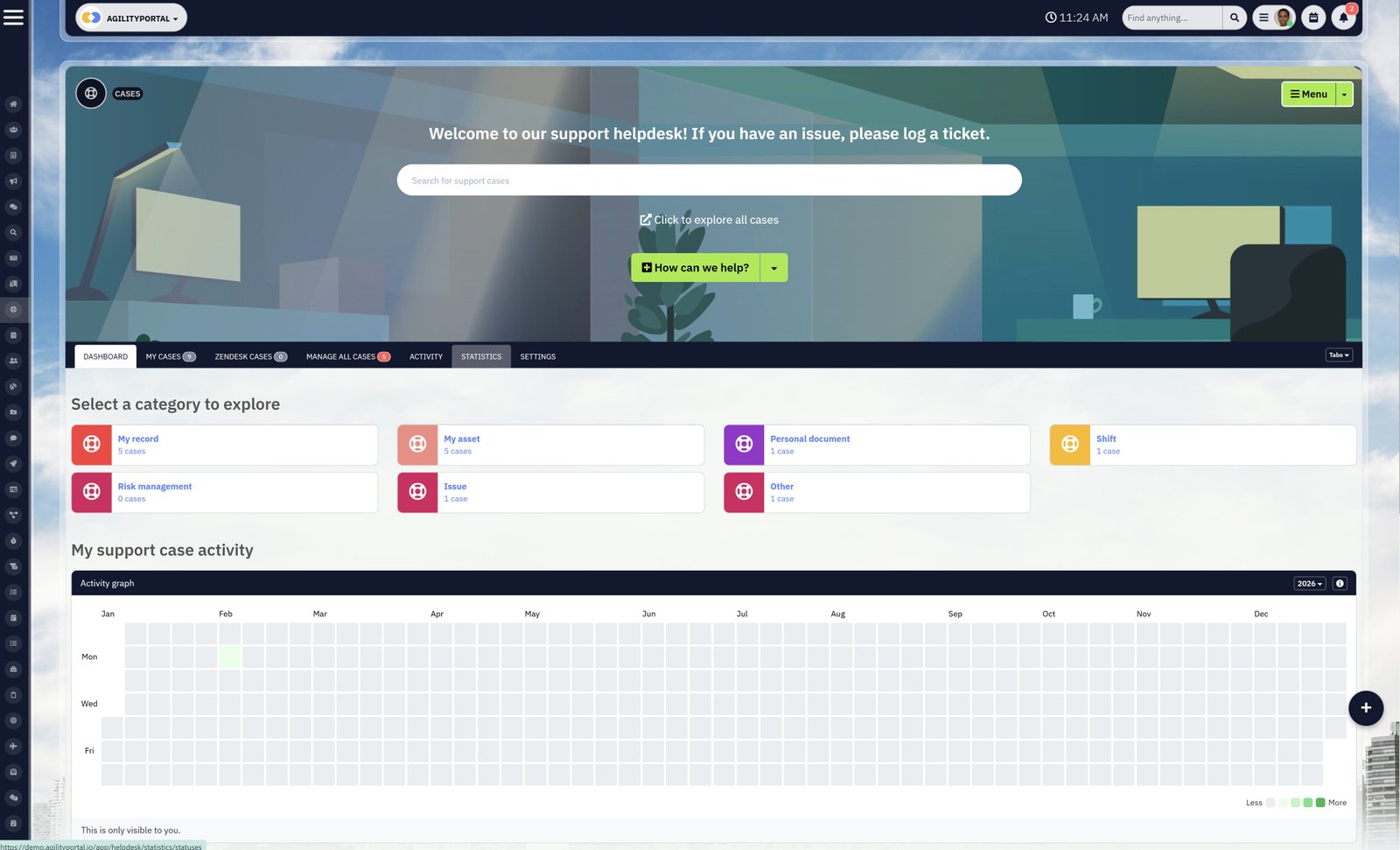
AgilityPortal – Case Management & Customer Communication Platform
AgilityPortal offers a modern case management system combined with internal communication and collaboration tools, making it ideal for businesses that want to connect customer support, internal teams, and workflows in one platform.
Unlike traditional help desk tools, AgilityPortal focuses on end-to-end case visibility, allowing teams to manage requests, track progress, and collaborate across departments.
Key capabilities include:
- Centralized case management and tracking system
- Internal team collaboration alongside customer cases
- Document sharing and knowledge management
- Workflow automation and task assignment
- Communication tools for both internal teams and external stakeholders
AgilityPortal is particularly suited for organizations that need more than just ticketing — especially those looking for a connected digital workplace with built-in case management.
Ready to Manage Customer Cases and Internal Collaboration in One Place?
Managing customer requests across disconnected emails, spreadsheets, and support tools quickly becomes inefficient and hard to control. Important updates get missed, cases lack visibility, and internal teams waste time chasing information instead of resolving issues faster.
AgilityPortal provides a modern case management platform that helps organizations centralize case tracking, internal communication, document sharing, and workflow collaboration in one connected workspace. Instead of relying on siloed systems, teams can manage cases, share updates, assign actions, and keep everyone aligned from a single platform.
- Centralize case management, updates, and communication in one platform
- Track case progress, ownership, and internal actions more clearly
- Improve collaboration across teams working on the same case
- Store case documents, notes, and updates in one searchable workspace
- Reduce delays and improve visibility across service workflows
AgilityPortal helps organizations replace fragmented case handling with a more connected, collaborative, and visible platform built for modern teams.
Start Your Free 14-Day Trial
No credit card required
#2. Zendesk – Leading Help Desk & Ticketing Software
Zendesk Support is one of the most widely used help desk ticketing systems, designed to manage customer inquiries from multiple channels such as email, live chat, social media, and more.
Zendesk allows teams to:
- organize and prioritize support tickets in one place
- flag and manage conversations efficiently
- automate workflows and ticket routing
- track performance with detailed analytics and reporting
- manage SLAs to ensure timely responses
It's a strong choice for businesses looking for a scalable customer support platform with advanced ticketing capabilities.
Looking for a Scalable Help Desk & Ticketing System?
Managing customer support across email, chat, and social channels can quickly become overwhelming without the right system in place. Tickets get lost, response times increase, and support teams struggle to maintain consistency across interactions.
Zendesk provides a powerful help desk and ticketing platform designed to centralize customer support operations. It enables teams to organize, prioritize, and respond to customer inquiries from multiple channels in one unified system.
- Manage support tickets from email, chat, and social media in one place
- Automate workflows and ticket routing for faster responses
- Track agent performance and support metrics with detailed reporting
- Implement SLA management to ensure timely resolutions
- Scale customer support operations as your business grows
Zendesk is widely used by businesses looking to streamline customer service operations and deliver consistent, high-quality support experiences.
View Zendesk on G2
Read verified customer reviews
#3. Kustomer – Customer Service CRM for High-Volume Support
Kustomer is a customer service CRM platform designed for organizations handling high volumes of support interactions.
Its focus is on delivering omnichannel customer service by combining CRM data with support workflows.
Key features include:
- unified customer timeline across channels
- automation of up to 40% of interactions through self-service
- AI-driven workflows and routing
- real-time customer insights for personalized support
Kustomer is ideal for businesses that need a CRM-powered help desk solution.
Need a Customer Service CRM for High-Volume Support?
Managing large volumes of support conversations across multiple channels becomes difficult when customer history, context, and service workflows are spread across disconnected tools. Teams lose visibility, customers repeat themselves, and service quality drops as complexity grows.
Kustomer provides a modern customer service CRM platform built for businesses that need to manage support at scale. It brings customer conversations, timelines, and service interactions into one place, helping teams deliver faster, more personalized support experiences.
- Unify customer conversations across channels in one timeline view
- Support high-volume customer service operations more efficiently
- Automate workflows and self-service interactions
- Give agents more customer context for personalized support
- Improve service consistency across digital channels
Kustomer is often used by organizations that want to combine CRM context with customer support workflows to improve service at scale.
View Kustomer on G2
Read verified customer reviews
#4. Front – Collaborative Customer Service Software
Front is a customer communication and help desk platform focused on improving team collaboration while managing support requests.
It allows teams to:
- manage emails, SMS, live chat, and social messages in one inbox
- collaborate internally on customer conversations
- assign and track tickets across teams
- integrate with CRM systems for better data management
Front is best suited for teams that want a more collaborative and personalized approach to customer support.
Want a More Collaborative Way to Manage Customer Conversations?
Handling customer emails, chat messages, and support requests across different tools can quickly become chaotic. Conversations get duplicated, context is lost, and teams struggle to collaborate effectively on customer responses.
Front offers a modern customer communication platform that combines a shared inbox with internal collaboration tools. It allows teams to manage conversations across multiple channels while working together in real time to deliver faster and more consistent customer support.
- Manage email, SMS, chat, and social messages in one shared inbox
- Collaborate internally on customer conversations before replying
- Assign and track messages across teams
- Integrate with CRM tools for better customer context
- Improve response times and team productivity
Front is ideal for teams that want a more collaborative and organized approach to customer communication without relying on traditional ticketing systems.
View Front on G2
Read verified customer reviews
AI Summary
- A CRM system is designed to help businesses manage customer relationships, track leads, organize sales pipelines, and centralize customer data across the buyer journey.
- A ticketing system focuses on customer support by helping teams manage service requests, assign tickets, track response times, and improve issue resolution across support channels.
- While CRM software is primarily used by sales and marketing teams, help desk ticketing software is built for customer service teams that need structured workflows and support visibility.
- Businesses comparing CRM vs ticketing system software should consider whether their priority is lead management and revenue growth or customer service efficiency and support automation.
- Many organizations benefit from combining both tools, allowing sales, marketing, and support teams to work from connected customer data and deliver more consistent customer experiences.
- Modern platforms that integrate CRM features with case management or help desk capabilities can reduce data silos, improve collaboration, and create a more complete view of each customer.
Most Popular Posts

Effective communication among team members is vital for the productivity and success of any organization. Surprisingly, 60% of companies lack a long-term internal communication strategy, which p...


Businesses thrive on communication for efficiency, productivity and accomplishment. When the right information is passed from the right designation in the organization, it promotes positivity an...
Categories
Blog
(2798)
Business Management
(347)
Employee Engagement
(216)
Digital Transformation
(188)
Growth
(128)
Intranets
(125)
Remote Work
(62)
Sales
(49)
Collaboration
(44)
Culture
(29)
Project management
(29)
Customer Experience
(27)
Knowledge Management
(22)
Leadership
(20)
Comparisons
(9)
News
(1)

Related Posts

If you're searching for the best intranet software for large enterprises, chances are you're already feeling the pain — too many systems, too many logins, and not enough clarity. At scale, things get messy fast. You've got teams spread across l...

On the surface, hiring developers feels straightforward. You post a job, review a few CVs, compare rates, and get started. But in reality? That's where things usually start going wrong. Businesses don't fail because they can't find developers—t...

Featured
If you're searching for a SharePoint alternative, let's be honest — something's already not working. Maybe adoption is low. Maybe your team avoids it. Or maybe everything just feels… harder than it should be. You're not alone. In fact, research shows...

If you've been searching what is a proxy server or even just what is a proxy, you're definitely not alone. As more people worry about privacy, security, and control online, the demand for proxy servers is growing fast. In fact, research s...

Looking for a smarter way to manage your workforce scheduling? You're not alone. As businesses scale, the challenge of efficiently managing shifts, availability, and time-off requests becomes overwhelming—especially without the right tool...


Jill Romford
I am a digital nomad, lover of exploring new places and making friends.
I love to travel and I love the internet. I take pictures of my travels and share them on the internet using Instagram.
Traveler, entrepreneur, and community builder. I share my insights on digital marketing and social media while inspiring you to live your fullest life.
Ready to learn more? 👍
One platform to optimize, manage and track all of your teams. Your new digital workplace is a click away. 🚀
Free for 14 days, no credit card required.